BPM changes how fast musical time moves. GRID changes how many places you can put sounds inside that same time. GROOVE can move the eighth-note “&” later without changing the BPM. That is the core of Sound Lab. In this guide, “beat” always means the steady pulse you could tap with your foot — not the whole drum pattern.
Sound Lab is fixed to 4/4. That means four regular beats in each bar, and the quarter note is the beat unit. You do not need to read notation here — just count 1 · 2 · 3 · 4 and repeat.3
FOUR BARS = ONE SOUND LAB LOOP
4-BAR LOOP · 16 BEATS TOTAL
BAR 01 contains beats 1–4 of the loop. Inside the bar you still count 1 · 2 · 3 · 4.
After bar 4, the Sound Lab pattern starts again at bar 1. Click any bar above to see where its four beats sit inside the full 16-beat loop.2
REMEMBERA bar is a container of musical time. A sequencer step is only a possible position inside that time.
02
THIS IS THE SPEED CONTROL
BPM = tempo
INTERACTIVE CALCULATOR
How long is my section?
SECTION TIME0:17.455
BEATS32
STEPS32
STEP LENGTH545 ms
8 bars × 4 beats at 110 BPM = 32 beats. The grid changes the number of step positions, not the section length.
1 BEAT0.545 s
1 BAR2.182 s
4-BAR LOOP8.727 s
1234
“I WANT THE WHOLE TRACK FASTER.”→ Raise BPM. At 140 BPM every beat, every bar and the whole four-bar loop take less time than at 110 BPM.
“I WANT THE WHOLE TRACK SLOWER.”→ Lower BPM. Grid and Groove are not tempo controls.
QUICK CHECKIf the loop takes the same number of seconds but sounds busier, you probably added more notes or switched to ⅛. If the loop itself takes fewer seconds, the BPM really increased.
BPM means “beats per minute”: how many beat pulses happen in one minute. In Sound Lab, one beat is the quarter-note pulse of our fixed 4/4 meter.13
03
MORE BOXES ≠ MORE TEMPO
Grid = resolution
16 STEPS4 steps per bar · one step on each beat8.727 s LOOP
¼16 positions
= SAME 4-BAR TIME =
⅛32 positions
IMPORTANT⅛ does not make the song twice as fast. It adds one extra position between two beats — the “&”. It may feel busier because you can place more hits.
04
WHAT DO I CLICK?
Four useful rhythm recipes
AHIT ON EVERY BEAT1 · 2 · 3 · 4
On a ¼ grid, turn on every step in one drum row. A kick on every quarter beat is the familiar four-on-the-floor pulse.1
BHIT ON 2 + 4Classic backbeat idea
Put a snare or clap on beats 2 and 4. This common idea is called a backbeat.4
CHIT ON EVERY “&”Needs the ⅛ grid
Choose ⅛ and use only the spaces between the numbered beats: 1 & 2 & 3 & 4 &. These offbeats can add motion without changing BPM.3
DONLY ON BEAT 1Lots of space
Place one hit at the start of each bar. Across the four-bar loop that gives you only four hits — useful for big accents, stabs or scene changes.
Which control do I need?
Whole track faster / slowerBPM
More positions between beats⅛ GRID
Straight or more swung eighthsGROOVE
Hear the four main beatsCLICK
More than one 4-bar ideaBUILD SECTIONS
05
ACTIVE ONLY WITH ⅛
Groove moves the “&”
1 → &: 273 ms& → 2: 273 ms
1&2
50%1 & 2EVEN EIGHTHS
60%1 & 2THE “&” MOVES LATER
DO NOT MIX THIS UPGroove does not change the BPM or the length of a beat. Beat 1 and beat 2 stay locked. Only the eighth-note “&” between them moves.
Sound Lab definition: 60% means the “&” happens 60% of the way from one quarter-note beat to the next. This is a clear control scale for this app. Other DAWs and groove systems may label or calculate swing percentages differently. Berklee's public electronic-music curriculum treats swing, syncopation and groove as related but distinct rhythm topics.10
06
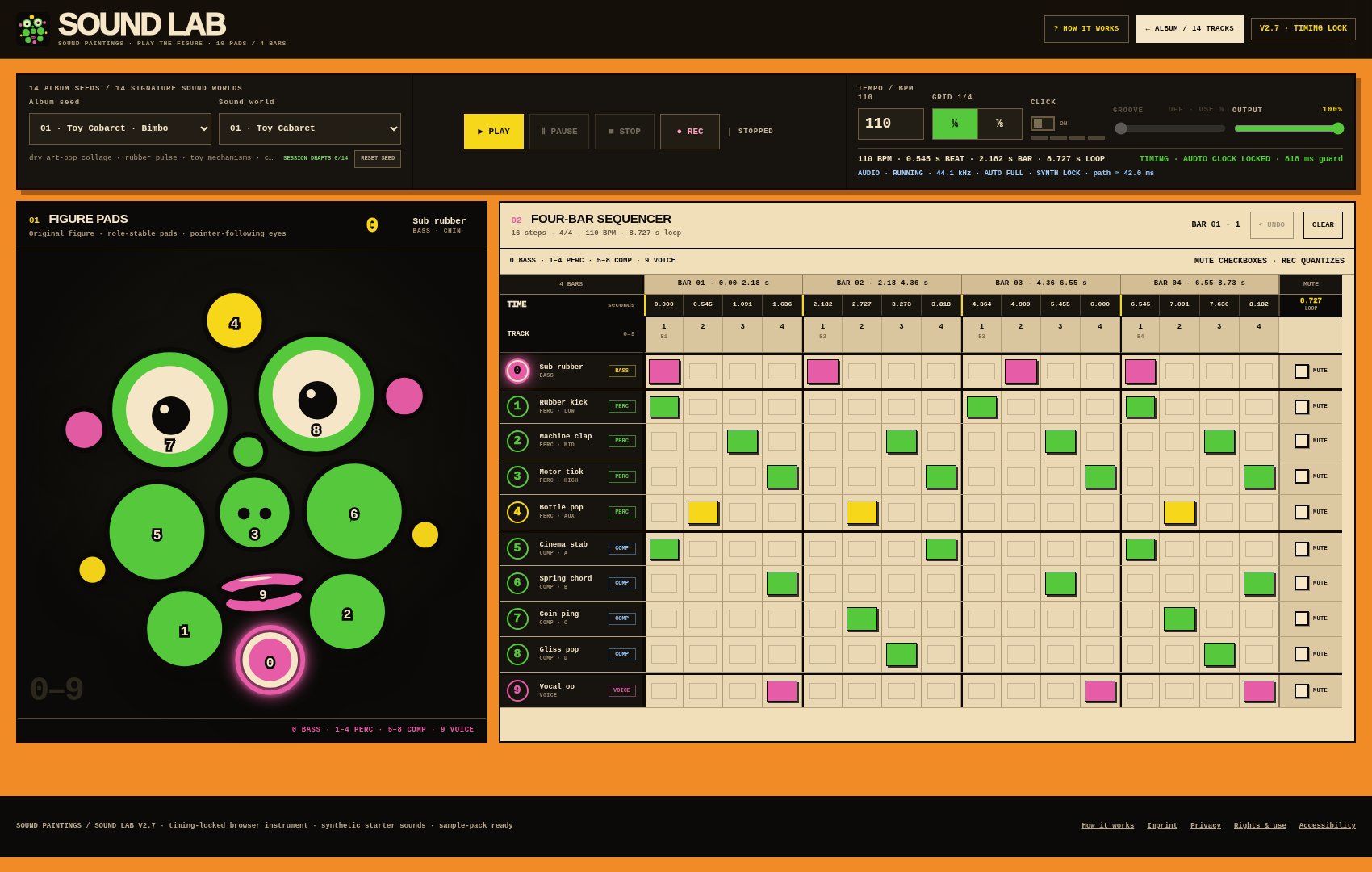
THE REAL SOUND LAB SCREEN
What does each area do?
123456
1ALBUM SEED + SOUND WORLDChoose a starting pattern and its ten-part instrument bank.
2PLAY · PAUSE · STOP · RECTransport controls. REC writes your pad hits to the current grid.
4FIGURE PADS 0–9Click the figure or press number keys. Each active part is also one sequencer track.
5TIME SCALEShows the real scheduled time of the steps. Use it to check BPM and groove visually.
6TRACKS + MUTEClick steps to program them. Mute silences a track and dims its matching figure pad.
07
FROM LOOP TO TRACK
Song structure without theory stress
Your four-bar loop is one musical idea. A track grows when ideas become larger sections and those sections create repetition, contrast and development. Ableton's beginner material describes arranging as turning small patterns into larger time blocks, often in multiples of 4, 8 or 16 bars.5
Those lengths are common building blocks, not laws. Open Music Theory notes that pop/rock sections often span 8–24 bars, and real songs use many different forms. Verse, chorus and bridge are useful names, but instrumental music can simply use A, B, Break, Intro and Outro.67
Load an example, then change it. These are simplified learning maps — section labels can differ between analyses, and adjacent same-type passages may be merged into one block.
INTRO: once + firstPRE follows VERSEBRIDGE / BREAK need an earlier body sectionOUTRO: once + lastNO SAME SECTION TWICE IN A ROWNEW BLOCKS INSERT BEFORE OUTRO
Tip: add Verse → Chorus, then create contrast with a Bridge or Break.
52 bars1:53 at 110 BPM
Click the main part of a block to cycle 4 / 8 / 12 / 16 bars. Use ‹ and › to move it, × to remove it. The builder protects Intro/Outro positions and blocks accidental consecutive duplicates. Real songs break rules; this tool prevents only the mistakes that usually confuse a beginner.
1
Foundation
Start with bass or one percussion part. Keep it simple enough that you can hear the pulse.
2
Pulse
If you get lost, switch on Click or put a drum on every beat. Then remove hits until it breathes.
3
Colour
Add accompaniment tracks 5–8 one at a time. Every track does not need to play all the time.
4
Character
Use track 9 / Voice as an event: an answer, accent or hook can be stronger than constant repetition.
5
Variation
Make a second idea by changing one or two things: mute a part, move a hit, change density, add an accent or a short fill.
6
Form
Put the ideas in an order. Repetition creates recognition; contrast creates direction. Then listen and edit.
This progression also matches the public syllabi of Berklee Online's paid production courses: pulse/meter and subdivisions first; then sequencing, quantization, accents, variations/fills, groove and arrangement. We use those public syllabi only as a cross-check — no paywalled lesson text is reproduced here.8910
ENOUGH TO START PLAYING
Sound Lab cheat sheet
4/44 quarter-note beats per bar
4 BARSone Sound Lab pattern loop
BPM ↑the whole track gets faster
BPM ↓the whole track gets slower
¼ GRID1 sequencer step per beat
⅛ GRIDbeat + “&” between beats
CLICKhear the four main beats
GROOVEmove only the eighth-note “&”
EVERY BEATturn on all ¼ steps in one drum row
2 + 4a common snare/clap backbeat
MORE ENERGYtry density, accents or another layer — not only more BPM
SONGarrange several ideas into sections
08
CHECK THE THEORY
Sources & course cross-check
The beginner explanations above were checked against open music-theory material, Ableton's public interactive lessons and the public syllabi of Berklee Online courses. The Berklee courses are paid courses; only their publicly visible curriculum topics are used here as an external quality check. Sound Lab-specific behavior — especially its Groove percentage — is labelled as app behavior, not universal theory.
 SOUND LABMUSIC MADE VISIBLE · NO NOTE READING NEEDED
 123456